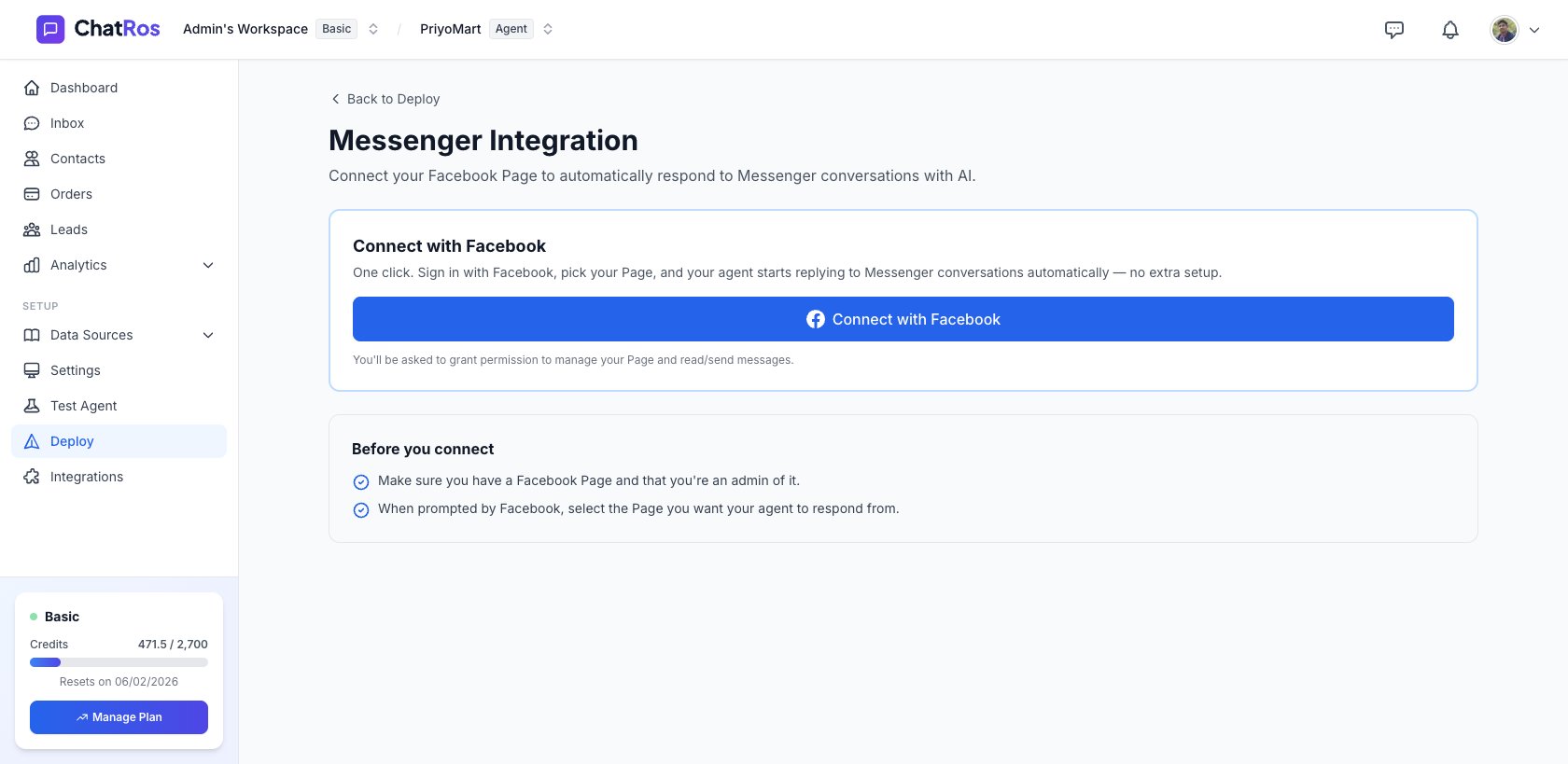
Connect your Facebook Page so your agent replies to Messenger conversations automatically.
Connect your Facebook Page and your agent will automatically respond to Messenger conversations with AI. Setup is a one‑click Facebook sign‑in — no webhooks or tokens to configure.
Return to Deploy → Messenger to view the connected Page or click Disconnect. Disconnecting stops your agent from handling that Page’s Messenger conversations.
Also on Instagram?
If your Instagram account is linked to this Page, connect it too so DMs are handled by the same agent.
{"docsConfig":{"theme":"mint","$schema":"https://mintlify.com/docs.json","name":"ChatRos Documentation","colors":{"primary":"#4F46E5","light":"#7C3AED","dark":"#4338CA"},"logo":{"light":"https://mintcdn.com/softiustech/r0-Hu3fzPtGK9Luj/logo/light-large.svg?fit=max\u0026auto=format\u0026n=r0-Hu3fzPtGK9Luj\u0026q=85\u0026s=537b699737fcd81a760bbb8aed916e73","dark":"https://mintcdn.com/softiustech/r0-Hu3fzPtGK9Luj/logo/dark-large.svg?fit=max\u0026auto=format\u0026n=r0-Hu3fzPtGK9Luj\u0026q=85\u0026s=3aa14c4e4e4368d2939eafcc9de7b2ba"},"favicon":"https://mintcdn.com/softiustech/r0-Hu3fzPtGK9Luj/favicon.svg?fit=max\u0026auto=format\u0026n=r0-Hu3fzPtGK9Luj\u0026q=85\u0026s=29952df389fa814424675f3eb5699b5d","navbar":{"links":[{"href":"mailto:support@chatros.com","label":"Support"}],"primary":{"type":"button","label":"Dashboard","href":"https://chatros.com/dashboard"}},"footer":{"socials":{"x":"https://x.com/chatros","github":"https://github.com/chatros","linkedin":"https://linkedin.com/company/chatros"}},"contextual":{"options":["copy","view","chatgpt","claude","perplexity","mcp","cursor","vscode"],"display":"header"},"styling":{"latex":false},"navigation":{"global":{"anchors":[{"anchor":"Documentation","icon":"book-open-cover","href":"https://docs.chatros.com/"},{"anchor":"Dashboard","icon":"gauge","href":"https://chatros.com/dashboard"}]},"pages":[]}},"deployment":{"deploymentMetadataValue":{"subdomain":"softiustech","hasAudioNarration":false,"actualSubdomain":"softiustech","customDomains":["docs.chatros.com"],"gitSource":{"type":"github","owner":"ashraful1599","repo":"docs","deployBranch":"main","contentDirectory":"","isPrivate":false,"mountPath":"","label":""},"chroma":{"liveDeploymentHistoryId":"6a55fd5cc9c475dea5aea3ae","collectionId":"d17c53d8-6746-4def-a13d-02bed5f27c1f","schemaVersion":"v3"},"entitlements":{},"buildId":"6a55fd5cc9c475dea5aea3ae:success","clientVersion":"0.0.3971","searchFilterCounts":[{"language":"default","tag":"User Guides","count":22},{"language":"default","tag":"Deploy Your Agent","count":8},{"language":"default","tag":"AI Agent Management","count":4},{"language":"default","tag":"Product Catalog","count":4},{"language":"default","tag":"Integrations","count":3},{"language":"default","tag":"Quick Start","count":3},{"language":"default","tag":"Help \u0026 Support","count":1},{"language":"default","tag":"Support","count":1}]},"assistantConfig":{"enableAskAiButton":false,"enableStarterQuestions":false,"enableAskAiSearchBar":true},"basePath":"","hasChatPermissions":false,"hasWebMcpPermissions":false,"toggles":[{"name":"kill-isr","enabled":true,"variant":{"name":"disabled","enabled":false,"feature_enabled":true},"impressionData":false},{"name":"agent-mintlify-slack","enabled":true,"variant":{"name":"disabled","enabled":false,"feature_enabled":true},"impressionData":false},{"name":"editor-v7-file-tree","enabled":true,"variant":{"name":"disabled","enabled":false,"feature_enabled":true},"impressionData":false},{"name":"agent-integrations-settings","enabled":true,"variant":{"name":"disabled","enabled":false,"feature_enabled":true},"impressionData":false},{"name":"automations-pr-grouping","enabled":true,"variant":{"name":"disabled","enabled":false,"feature_enabled":true},"impressionData":false},{"name":"custom-prefix","enabled":true,"variant":{"name":"disabled","enabled":false,"feature_enabled":true},"impressionData":false},{"name":"analytics-v7","enabled":true,"variant":{"name":"disabled","enabled":false,"feature_enabled":true},"impressionData":false},{"name":"user-flows-analytics","enabled":true,"variant":{"name":"disabled","enabled":false,"feature_enabled":true},"impressionData":false},{"name":"no-publish-flow","enabled":true,"variant":{"name":"disabled","enabled":false,"feature_enabled":true},"impressionData":false},{"name":"workos-onboarding","enabled":true,"variant":{"name":"disabled","enabled":false,"feature_enabled":true},"impressionData":false},{"name":"llms-txt-v2","enabled":true,"variant":{"name":"disabled","enabled":false,"feature_enabled":true},"impressionData":false},{"name":"pause-universal-search-reconcile","enabled":true,"variant":{"name":"disabled","enabled":false,"feature_enabled":true},"impressionData":false},{"name":"snapshot-serving-live","enabled":true,"variant":{"name":"disabled","enabled":false,"feature_enabled":true},"impressionData":false},{"name":"stripTemperatureMiddleware","enabled":true,"variant":{"name":"disabled","enabled":false,"feature_enabled":true},"impressionData":false},{"name":"per-site-search-delta","enabled":true,"variant":{"name":"disabled","enabled":false,"feature_enabled":true},"impressionData":false},{"name":"support-platform-pylon-zendesk","enabled":true,"variant":{"name":"disabled","enabled":false,"feature_enabled":true},"impressionData":false},{"name":"snapshot-serving","enabled":true,"variant":{"name":"disabled","enabled":false,"feature_enabled":true},"impressionData":false},{"name":"instant-rollback","enabled":true,"variant":{"name":"disabled","enabled":false,"feature_enabled":true},"impressionData":false},{"name":"granular-notifications-server","enabled":true,"variant":{"name":"disabled","enabled":false,"feature_enabled":true},"impressionData":false},{"name":"granular-notifications","enabled":true,"variant":{"name":"disabled","enabled":false,"feature_enabled":true},"impressionData":false},{"name":"editor-private-page-search","enabled":true,"variant":{"name":"disabled","enabled":false,"feature_enabled":true},"impressionData":false},{"name":"automations-fable","enabled":true,"variant":{"name":"disabled","enabled":false,"feature_enabled":true},"impressionData":false},{"name":"fixed-ai-action-pricing","enabled":true,"variant":{"name":"disabled","enabled":false,"feature_enabled":true},"impressionData":false},{"name":"automation-resolve-merge-conflict","enabled":true,"variant":{"name":"disabled","enabled":false,"feature_enabled":true},"impressionData":false},{"name":"scoped-publishing","enabled":true,"variant":{"name":"disabled","enabled":false,"feature_enabled":true},"impressionData":false},{"name":"mintql","enabled":true,"variant":{"name":"disabled","enabled":false,"feature_enabled":true},"impressionData":false},{"name":"page-level-analytics","enabled":true,"variant":{"name":"disabled","enabled":false,"feature_enabled":true},"impressionData":false},{"name":"editor-version-history-v2","enabled":true,"variant":{"name":"disabled","enabled":false,"feature_enabled":true},"impressionData":false},{"name":"editor-nav-generations","enabled":true,"variant":{"name":"disabled","enabled":false,"feature_enabled":true},"impressionData":false},{"name":"billing-page-v2","enabled":true,"variant":{"name":"disabled","enabled":false,"feature_enabled":true},"impressionData":false},{"name":"workspace-projects","enabled":true,"variant":{"name":"disabled","enabled":false,"feature_enabled":true},"impressionData":false},{"name":"assistant-v5","enabled":true,"variant":{"name":"disabled","enabled":false,"feature_enabled":true},"impressionData":false},{"name":"byok-sep-25","enabled":true,"variant":{"name":"disabled","enabled":false,"feature_enabled":true},"impressionData":false},{"name":"fork-pr-previews","enabled":true,"variant":{"name":"disabled","enabled":false,"feature_enabled":true},"impressionData":false},{"name":"revalidation-jwt","enabled":true,"variant":{"name":"disabled","enabled":false,"feature_enabled":true},"impressionData":false},{"name":"vite-origin","enabled":true,"variant":{"name":"disabled","enabled":false,"feature_enabled":true},"impressionData":false},{"name":"editor-agent-model-picker","enabled":true,"variant":{"name":"disabled","enabled":false,"feature_enabled":true},"impressionData":false},{"name":"billing-updated-9-15","enabled":true,"variant":{"name":"disabled","enabled":false,"feature_enabled":true},"impressionData":false},{"name":"workos-sso-scim","enabled":true,"variant":{"name":"disabled","enabled":false,"feature_enabled":true},"impressionData":false},{"name":"hobby-abuse-scan","enabled":true,"variant":{"name":"disabled","enabled":false,"feature_enabled":true},"impressionData":false},{"name":"dashboard-inbox","enabled":true,"variant":{"name":"disabled","enabled":false,"feature_enabled":true},"impressionData":false},{"name":"workos-signup","enabled":true,"variant":{"name":"disabled","enabled":false,"feature_enabled":true},"impressionData":false},{"name":"workos-enabled","enabled":true,"variant":{"name":"disabled","enabled":false,"feature_enabled":true},"impressionData":false}],"isAtlas":false,"googleFontsInlined":false},"customCss":[{"filePath":"styles.css","content":".nav-logo{height:3.5rem!important;max-height:3.5rem!important}"}],"page":{"pagePath":"user-guides/deploy/messenger","slug":"/user-guides/deploy/messenger","pageMetadata":{"title":"Messenger","description":"Connect your Facebook Page so your agent replies to Messenger conversations automatically.","href":"/user-guides/deploy/messenger"},"description":{"compiledSource":"\"use strict\";\nconst {jsx: _jsx} = arguments[0];\nconst {useMDXComponents: _provideComponents} = arguments[0];\nfunction _createMdxContent(props) {\n const _components = {\n p: \"p\",\n ..._provideComponents(),\n ...props.components\n };\n return _jsx(_components.p, {\n children: \"Connect your Facebook Page so your agent replies to Messenger conversations automatically.\"\n });\n}\nfunction MDXContent(props = {}) {\n const {wrapper: MDXLayout} = {\n ..._provideComponents(),\n ...props.components\n };\n return MDXLayout ? _jsx(MDXLayout, {\n ...props,\n children: _jsx(_createMdxContent, {\n ...props\n })\n }) : _createMdxContent(props);\n}\nreturn {\n default: MDXContent\n};\n","frontmatter":{},"scope":{}},"pageType":"default","mdx":{"mdxSource":{"compiledSource":"\"use strict\";const{Fragment:_Fragment,jsx:_jsx,jsxs:_jsxs}=arguments[0];const{useMDXComponents:_provideComponents}=arguments[0];function _createMdxContent(props){const _components={em:`em`,li:`li`,p:`p`,strong:`strong`,ul:`ul`,..._provideComponents(),...props.components},{Card,Frame,Heading,Note,OptimizedImage,Step,Steps}=_components;if(!Card)_missingMdxReference(`Card`,true);if(!Frame)_missingMdxReference(`Frame`,true);if(!Heading)_missingMdxReference(`Heading`,true);if(!Note)_missingMdxReference(`Note`,true);if(!OptimizedImage)_missingMdxReference(`OptimizedImage`,true);if(!Step)_missingMdxReference(`Step`,true);if(!Steps)_missingMdxReference(`Steps`,true);return _jsxs(_Fragment,{children:[_jsx(_components.p,{children:`Connect your Facebook Page and your agent will automatically respond to Messenger conversations with AI. Setup is a one‑click Facebook sign‑in — no webhooks or tokens to configure.`}),`\n`,_jsx(Heading,{level:`2`,id:`before-you-connect`,children:`Before you connect`}),`\n`,_jsxs(_components.ul,{children:[`\n`,_jsxs(_components.li,{children:[`You have a `,_jsx(_components.strong,{children:`Facebook Page`}),` and you’re an `,_jsx(_components.strong,{children:`admin`}),` of it.`]}),`\n`,_jsx(_components.li,{children:`You know which Page your agent should reply from (you’ll pick it during setup if you manage more than one).`}),`\n`]}),`\n`,_jsx(Heading,{level:`2`,id:`connect-messenger`,children:`Connect Messenger`}),`\n`,_jsxs(Steps,{children:[_jsxs(Step,{title:`Open the Messenger channel`,children:[_jsxs(_components.p,{children:[`From your agent, go to `,_jsx(_components.strong,{children:`Deploy → Integration Channels → Messenger`}),`.`]}),_jsx(Frame,{caption:`The Messenger connect panel.`,children:_jsx(OptimizedImage,{src:`https://mintcdn.com/softiustech/r0-Hu3fzPtGK9Luj/images/user-guides/deploy/messenger-panel.png?fit=max\u0026auto=format\u0026n=r0-Hu3fzPtGK9Luj\u0026q=85\u0026s=5b2e1b0b3cb322e976e9eea801259c29`,alt:`Messenger integration panel with Connect with Facebook button`,\"data-og-width\":`1680`,width:`1680`,\"data-og-height\":`819`,height:`819`,\"data-path\":`images/user-guides/deploy/messenger-panel.png`,\"data-optimize\":`true`,\"data-opv\":`3`,srcset:`https://mintcdn.com/softiustech/r0-Hu3fzPtGK9Luj/images/user-guides/deploy/messenger-panel.png?w=280\u0026fit=max\u0026auto=format\u0026n=r0-Hu3fzPtGK9Luj\u0026q=85\u0026s=c1894d32dc2bf0de37d076cd953c5014 280w, https://mintcdn.com/softiustech/r0-Hu3fzPtGK9Luj/images/user-guides/deploy/messenger-panel.png?w=560\u0026fit=max\u0026auto=format\u0026n=r0-Hu3fzPtGK9Luj\u0026q=85\u0026s=959daa9adc9d7f6b2e22d9396349353e 560w, https://mintcdn.com/softiustech/r0-Hu3fzPtGK9Luj/images/user-guides/deploy/messenger-panel.png?w=840\u0026fit=max\u0026auto=format\u0026n=r0-Hu3fzPtGK9Luj\u0026q=85\u0026s=c13162c9e1bacf85fe5911abc1642855 840w, https://mintcdn.com/softiustech/r0-Hu3fzPtGK9Luj/images/user-guides/deploy/messenger-panel.png?w=1100\u0026fit=max\u0026auto=format\u0026n=r0-Hu3fzPtGK9Luj\u0026q=85\u0026s=0cc6c75f13e9e7c6a835e9f3a45c2b28 1100w, https://mintcdn.com/softiustech/r0-Hu3fzPtGK9Luj/images/user-guides/deploy/messenger-panel.png?w=1650\u0026fit=max\u0026auto=format\u0026n=r0-Hu3fzPtGK9Luj\u0026q=85\u0026s=57f6c0c1d2984903d09228e20a644b38 1650w, https://mintcdn.com/softiustech/r0-Hu3fzPtGK9Luj/images/user-guides/deploy/messenger-panel.png?w=2500\u0026fit=max\u0026auto=format\u0026n=r0-Hu3fzPtGK9Luj\u0026q=85\u0026s=25c486ccd04346d6dcf1db8f319285c8 2500w`})})]}),_jsx(Step,{title:`Click “Connect with Facebook”`,children:_jsx(_components.p,{children:`You’ll be redirected to Facebook to sign in and grant permission to manage your Page and read/send messages.`})}),_jsx(Step,{title:`Grant permissions`,children:_jsx(_components.p,{children:`Approve the requested permissions. When you’re done, Facebook sends you back to ChatRos.`})}),_jsxs(Step,{title:`Choose your Page (if prompted)`,children:[_jsxs(_components.p,{children:[`If you manage more than one Page, pick the one this agent should respond from, then click `,_jsx(_components.strong,{children:`Connect This Page`}),`.`]}),_jsxs(Note,{children:[`📸 Screenshot: the `,_jsx(_components.strong,{children:`Choose a Facebook Page`}),` selection screen `,_jsx(_components.em,{children:`(to be added)`}),`.`]})]}),_jsxs(Step,{title:`Done`,children:[_jsxs(_components.p,{children:[`You’ll see a green `,_jsx(_components.strong,{children:`Connected`}),` card showing your Page name and ID. Your agent now replies to Messenger automatically — no further setup needed.`]}),_jsxs(Note,{children:[`📸 Screenshot: the connected Messenger card `,_jsx(_components.em,{children:`(to be added)`}),`.`]})]})]}),`\n`,_jsx(Heading,{level:`2`,id:`what-your-agent-can-do-on-messenger`,children:`What your agent can do on Messenger`}),`\n`,_jsxs(_components.ul,{children:[`\n`,_jsxs(_components.li,{children:[_jsx(_components.strong,{children:`Reply automatically`}),` to Messenger conversations on your Page.`]}),`\n`,_jsxs(_components.li,{children:[_jsx(_components.strong,{children:`Send and receive images`}),`.`]}),`\n`,_jsxs(_components.li,{children:[_jsx(_components.strong,{children:`Show a typing indicator`}),` and report `,_jsx(_components.strong,{children:`delivery and read receipts`}),`.`]}),`\n`]}),`\n`,_jsx(Heading,{level:`2`,id:`manage-or-disconnect`,children:`Manage or disconnect`}),`\n`,_jsxs(_components.p,{children:[`Return to `,_jsx(_components.strong,{children:`Deploy → Messenger`}),` to view the connected Page or click `,_jsx(_components.strong,{children:`Disconnect`}),`. Disconnecting stops your agent from handling that Page’s Messenger conversations.`]}),`\n`,_jsx(Card,{title:`Also on Instagram?`,icon:`instagram`,href:`/user-guides/deploy/instagram`,children:_jsx(_components.p,{children:`If your Instagram account is linked to this Page, connect it too so DMs are handled by the same agent.`})})]})}function MDXContent(props={}){const{wrapper:MDXLayout}={..._provideComponents(),...props.components};return MDXLayout?_jsx(MDXLayout,{...props,children:_jsx(_createMdxContent,{...props})}):_createMdxContent(props)}return{default:MDXContent};function _missingMdxReference(id,component){throw new Error(`Expected `+(component?`component`:`object`)+\" `\"+id+\"` to be defined: you likely forgot to import, pass, or provide it.\")}","frontmatter":{},"scope":{"config":{},"pageMetadata":{"title":"Messenger","description":"Connect your Facebook Page so your agent replies to Messenger conversations automatically.","href":"/user-guides/deploy/messenger"}}},"mdxSourceWithNoJs":null},"mdxExtracts":{"tableOfContents":[{"title":"Before you connect","slug":"before-you-connect","depth":2,"children":[]},{"title":"Connect Messenger","slug":"connect-messenger","depth":2,"children":[]},{"title":"What your agent can do on Messenger","slug":"what-your-agent-can-do-on-messenger","depth":2,"children":[]},{"title":"Manage or disconnect","slug":"manage-or-disconnect","depth":2,"children":[]}],"codeExamples":{}},"jsLinks":[],"subdomain":"softiustech","siteName":"ChatRos Documentation","title":"Messenger - ChatRos Documentation","navMaps":{"firstHrefInVersion":{},"firstHrefInLanguage":{}},"lastModified":"2026-07-14T08:27:06.972Z","originalFileLocation":"user-guides/deploy/messenger.mdx"},"headHtml":"\u003cscript data-mint-head>(function(){var d=document.documentElement,p=null;if(!p){try{p=localStorage.getItem(\"isDarkMode\")}catch(e){}if(p==='true')p='dark';else if(p==='false')p='light';if(p!=='light'\u0026\u0026p!=='dark'\u0026\u0026p!=='system')p=\"system\"}var r=p==='system'?(matchMedia(\"(prefers-color-scheme: dark)\").matches?'dark':'light'):p;d.classList.remove(r==='dark'?'light':'dark');d.classList.add(r);d.setAttribute(\"data-theme-preference\",p)})();\u003c/script>\u003cmeta data-mint-head name=\"description\" content=\"Connect your Facebook Page so your agent replies to Messenger conversations automatically.\">\u003cmeta data-mint-head name=\"application-name\" content=\"ChatRos Documentation\">\u003cmeta data-mint-head name=\"generator\" content=\"Mintlify\">\u003clink data-mint-head rel=\"icon\" type=\"image/png\" sizes=\"192x192\" href=\"/mintlify-assets/_mintlify/favicons/softiustech/EvHND5P9HB0YlKWb/_generated/favicon/android-chrome-192x192.png\" media=\"(prefers-color-scheme: light)\">\u003clink data-mint-head rel=\"apple-touch-icon\" type=\"image/png\" sizes=\"180x180\" href=\"/mintlify-assets/_mintlify/favicons/softiustech/EvHND5P9HB0YlKWb/_generated/favicon/apple-touch-icon.png\">\u003clink data-mint-head rel=\"icon\" type=\"image/png\" sizes=\"16x16\" href=\"/mintlify-assets/_mintlify/favicons/softiustech/EvHND5P9HB0YlKWb/_generated/favicon/favicon-16x16.png\" media=\"(prefers-color-scheme: light)\">\u003clink data-mint-head rel=\"icon\" type=\"image/png\" sizes=\"32x32\" href=\"/mintlify-assets/_mintlify/favicons/softiustech/EvHND5P9HB0YlKWb/_generated/favicon/favicon-32x32.png\" media=\"(prefers-color-scheme: light)\">\u003clink data-mint-head rel=\"shortcut icon\" type=\"image/x-icon\" href=\"/mintlify-assets/_mintlify/favicons/softiustech/EvHND5P9HB0YlKWb/_generated/favicon/favicon.ico\" media=\"(prefers-color-scheme: light)\">\u003clink data-mint-head rel=\"icon\" type=\"image/png\" sizes=\"192x192\" href=\"/mintlify-assets/_mintlify/favicons/softiustech/EvHND5P9HB0YlKWb/_generated/favicon-dark/android-chrome-192x192.png\" media=\"(prefers-color-scheme: dark)\">\u003clink data-mint-head rel=\"icon\" type=\"image/png\" sizes=\"16x16\" href=\"/mintlify-assets/_mintlify/favicons/softiustech/EvHND5P9HB0YlKWb/_generated/favicon-dark/favicon-16x16.png\" media=\"(prefers-color-scheme: dark)\">\u003clink data-mint-head rel=\"icon\" type=\"image/png\" sizes=\"32x32\" href=\"/mintlify-assets/_mintlify/favicons/softiustech/EvHND5P9HB0YlKWb/_generated/favicon-dark/favicon-32x32.png\" media=\"(prefers-color-scheme: dark)\">\u003clink data-mint-head rel=\"shortcut icon\" type=\"image/x-icon\" href=\"/mintlify-assets/_mintlify/favicons/softiustech/EvHND5P9HB0YlKWb/_generated/favicon-dark/favicon.ico\" media=\"(prefers-color-scheme: dark)\">\u003cmeta data-mint-head property=\"og:title\" content=\"Messenger - ChatRos Documentation\">\u003cmeta data-mint-head property=\"og:description\" content=\"Connect your Facebook Page so your agent replies to Messenger conversations automatically.\">\u003cmeta data-mint-head property=\"og:site_name\" content=\"ChatRos Documentation\">\u003cmeta data-mint-head property=\"og:url\" content=\"https://docs.chatros.com/user-guides/deploy/messenger\">\u003cmeta data-mint-head property=\"og:type\" content=\"website\">\u003cmeta data-mint-head property=\"og:image\" content=\"https://softiustech.mintlify.app/_mintlify/api/og/v2?division=Deploy+Your+Agent\u0026amp;title=Messenger\u0026amp;description=Connect+your+Facebook+Page+so+your+agent+replies+to+Messenger+conversations+automatically.\u0026amp;theme=9b6ad218cbde2a744be87e8f\u0026amp;signature=92f6a9d9f0c4442b47911b45253986df4e71fdf4606a3fe95feb56a784e14230\">\u003cmeta data-mint-head property=\"og:image:width\" content=\"1200\">\u003cmeta data-mint-head property=\"og:image:height\" content=\"630\">\u003cmeta data-mint-head name=\"twitter:card\" content=\"summary_large_image\">\u003cmeta data-mint-head name=\"twitter:title\" content=\"Messenger - ChatRos Documentation\">\u003cmeta data-mint-head name=\"twitter:description\" content=\"Connect your Facebook Page so your agent replies to Messenger conversations automatically.\">\u003cmeta data-mint-head name=\"twitter:image\" content=\"https://softiustech.mintlify.app/_mintlify/api/og/v2?division=Deploy+Your+Agent\u0026amp;title=Messenger\u0026amp;description=Connect+your+Facebook+Page+so+your+agent+replies+to+Messenger+conversations+automatically.\u0026amp;theme=9b6ad218cbde2a744be87e8f\u0026amp;signature=92f6a9d9f0c4442b47911b45253986df4e71fdf4606a3fe95feb56a784e14230\">\u003cmeta data-mint-head name=\"twitter:image:width\" content=\"1200\">\u003cmeta data-mint-head name=\"twitter:image:height\" content=\"630\">\u003cmeta data-mint-head name=\"msapplication-config\" content=\"/mintlify-assets/_mintlify/favicons/softiustech/EvHND5P9HB0YlKWb/_generated/favicon/browserconfig.xml\">\u003cmeta data-mint-head name=\"apple-mobile-web-app-title\" content=\"ChatRos Documentation\">\u003cmeta data-mint-head name=\"msapplication-TileColor\" content=\"#4F46E5\">\u003clink data-mint-head rel=\"canonical\" href=\"https://docs.chatros.com/user-guides/deploy/messenger\">\u003clink data-mint-head rel=\"alternate\" type=\"application/xml\" href=\"/sitemap.xml\">\u003clink data-mint-head rel=\"alternate\" type=\"text/markdown\" href=\"/user-guides/deploy/messenger.md\">\u003cscript data-mint-head type=\"application/ld+json\">{\"@context\":\"https://schema.org\",\"@graph\":[{\"@type\":\"Organization\",\"@id\":\"https://docs.chatros.com/#organization\",\"name\":\"ChatRos Documentation\",\"url\":\"https://docs.chatros.com\",\"logo\":{\"@type\":\"ImageObject\",\"url\":\"https://mintcdn.com/softiustech/r0-Hu3fzPtGK9Luj/logo/light-large.svg?fit=max\u0026auto=format\u0026n=r0-Hu3fzPtGK9Luj\u0026q=85\u0026s=537b699737fcd81a760bbb8aed916e73\"}},{\"@type\":\"WebSite\",\"@id\":\"https://docs.chatros.com#website\",\"name\":\"ChatRos Documentation\",\"url\":\"https://docs.chatros.com\",\"publisher\":{\"@id\":\"https://docs.chatros.com/#organization\"}},{\"@type\":\"WebPage\",\"@id\":\"https://docs.chatros.com/user-guides/deploy/messenger#webpage\",\"url\":\"https://docs.chatros.com/user-guides/deploy/messenger\",\"name\":\"Messenger\",\"description\":\"Connect your Facebook Page so your agent replies to Messenger conversations automatically.\",\"dateModified\":\"2026-07-14T08:27:06.972Z\",\"isPartOf\":{\"@id\":\"https://docs.chatros.com#website\"},\"breadcrumb\":{\"@id\":\"https://docs.chatros.com/user-guides/deploy/messenger#breadcrumb\"}},{\"@type\":\"BreadcrumbList\",\"@id\":\"https://docs.chatros.com/user-guides/deploy/messenger#breadcrumb\",\"itemListElement\":[{\"@type\":\"ListItem\",\"position\":1,\"name\":\"Deploy Your Agent\",\"item\":\"https://docs.chatros.com/user-guides/deploy/introduction\"},{\"@type\":\"ListItem\",\"position\":2,\"name\":\"Messenger\",\"item\":\"https://docs.chatros.com/user-guides/deploy/messenger\"}]},{\"@type\":[\"Article\",\"TechArticle\"],\"@id\":\"https://docs.chatros.com/user-guides/deploy/messenger#article\",\"headline\":\"Messenger\",\"name\":\"Messenger\",\"description\":\"Connect your Facebook Page so your agent replies to Messenger conversations automatically.\",\"url\":\"https://docs.chatros.com/user-guides/deploy/messenger\",\"mainEntityOfPage\":{\"@id\":\"https://docs.chatros.com/user-guides/deploy/messenger#webpage\"},\"dateModified\":\"2026-07-14T08:27:06.972Z\",\"publisher\":{\"@id\":\"https://docs.chatros.com/#organization\"},\"isPartOf\":{\"@id\":\"https://docs.chatros.com#website\"}}]}\u003c/script>\u003cscript data-mint-head type=\"application/ld+json\">{\"@context\":\"https://schema.org\",\"@type\":\"WebSite\",\"name\":\"ChatRos Documentation\",\"creator\":{\"@type\":\"Organization\",\"name\":\"Mintlify\",\"url\":\"https://mintlify.com\"}}\u003c/script>","siteName":"ChatRos Documentation","nav":{"global":{"anchors":[{"anchor":"Documentation","icon":"book-open-cover","href":"https://docs.chatros.com/"},{"anchor":"Dashboard","icon":"gauge","href":"https://chatros.com/dashboard"}]},"tabs":[{"tab":"User Guides","groups":[{"group":"Quick Start","pages":[{"title":"Welcome to ChatRos","href":"/user-guides/quick-start/introduction"},{"title":"Build Your First AI Agent","href":"/user-guides/quick-start/your-first-agent"},{"title":"Best Practices","href":"/user-guides/quick-start/best-practices"}]},{"group":"AI Agent Management","pages":[{"title":"Sources","href":"/user-guides/agent/sources"},{"title":"Settings","href":"/user-guides/agent/settings"},{"title":"Activity","href":"/user-guides/agent/activity"},{"title":"Analytics","href":"/user-guides/agent/analytics"}]},{"group":"Deploy Your Agent","pages":[{"title":"Deploy Your Agent","href":"/user-guides/deploy/introduction"},{"title":"Chat Widget","href":"/user-guides/deploy/chat-widget"},{"title":"WhatsApp","description":"Connect a WhatsApp Business number so your agent reads and replies to customer messages automatically.","href":"/user-guides/deploy/whatsapp"},{"title":"Messenger","href":"/user-guides/deploy/messenger"},{"title":"Instagram","description":"Connect your Instagram Business or Creator account so your agent answers DMs automatically.","href":"/user-guides/deploy/instagram"},{"title":"Telegram","href":"/user-guides/deploy/telegram"},{"title":"Shopify","href":"/user-guides/deploy/shopify"},{"title":"WooCommerce","href":"/user-guides/deploy/woocommerce"}]},{"group":"Product Catalog","pages":[{"title":"Product Catalog","href":"/user-guides/catalog/introduction"},{"title":"Adding Products \u0026 Variants","href":"/user-guides/catalog/products-and-variants"},{"title":"Importing Products","href":"/user-guides/catalog/importing"},{"title":"Image Product Search","href":"/user-guides/catalog/image-search"}]},{"group":"Integrations","pages":[{"title":"Klaviyo Integration","href":"/user-guides/integrations/klaviyo"},{"title":"Mailchimp Integration","href":"/user-guides/integrations/mailchimp"},{"title":"MailerLite Integration","href":"/user-guides/integrations/mailerlite"}]}]},{"tab":"Help \u0026 Support","pages":[{"title":"Help \u0026 Support","href":"/help/faq"}]}]},"title":"Messenger - ChatRos Documentation","buildId":"dpl_DFJrtvUi8HS5F9nkooKuDJsuD5BM","deploymentId":"dpl_DFJrtvUi8HS5F9nkooKuDJsuD5BM","dynamics":["07c022d89b","a74be98ba7"],"chunks":["Frame-COGkNuA6.js","DynamicMarkdown-85clUA0i.js","zoom-image-lightbox-BZxD9MAj.js","lightbox-handle-r17bVUz3.js"]}